Delete Account
Last Updated: January 2026
We understand that you may want to delete your CupCount account. This page outlines the conditions, consequences, and procedures for permanently deleting your account and associated data.
Warning: Account deletion is permanent and cannot be undone. Please read the following conditions carefully before proceeding.
1. What Happens When You Delete Your Account
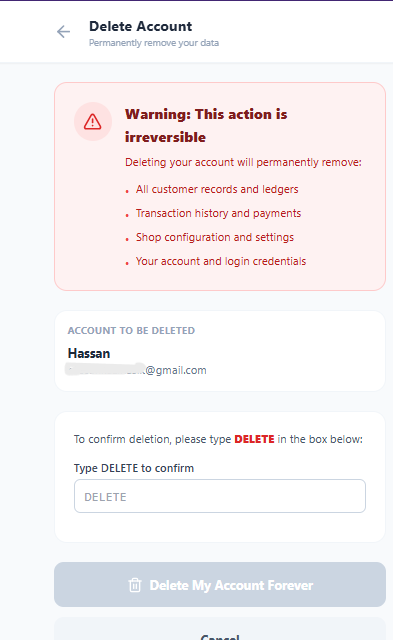
Upon confirming your request to delete your account, the following actions will take place:
- !
Permanent Data Loss
All your personal information, profile settings, and preferences will be permanently erased from our active databases.
- !
Transaction History Erasure
Your entire history of sales, expenses, customer records, and reports will be deleted. You will no longer be able to access or export this data.
- !
Subscription Cancellation
Any active premium subscriptions will be immediately cancelled. No refunds will be issued for the remaining period of the subscription, as per our Refund Policy.
- !
Irreversible Action
Once deleted, your account cannot be recovered. If you wish to use CupCount again in the future, you will need to create a brand new account.
2. Data Retention for Legal Reasons
While your account will be deleted from our active systems, we may retain certain data for a limited period solely for:
- Legal compliance and tax obligations
- Fraud prevention and security audits
- Resolving disputes or enforcing our terms
This retained data will be securely stored and isolated from further processing until it is no longer legally required, after which it will be permanently deleted.
3. How to Request Account Deletion
You can request to delete your account through the following methods:
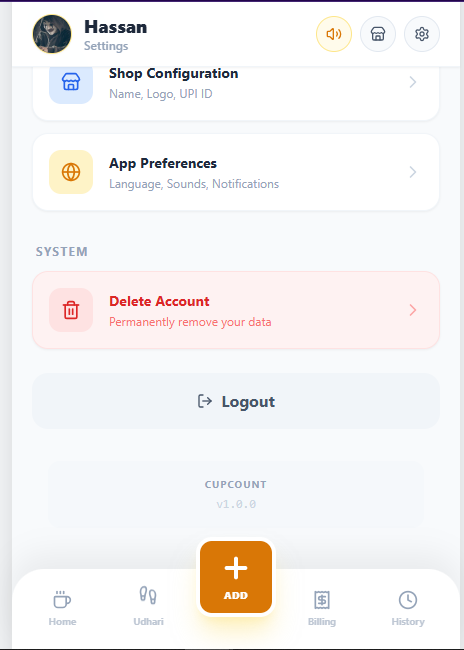
In-App Deletion
- Open the CupCount App
- Go to Settings
- Select Account Management
- Tap on Delete Account
- Follow the confirmation steps
Step 1
Step 2
4. Contact Us
If you have any questions regarding these conditions or need assistance with the deletion process, please contact us: